Showing posts with label Stickers. Show all posts

Wednesday, February 4, 2026

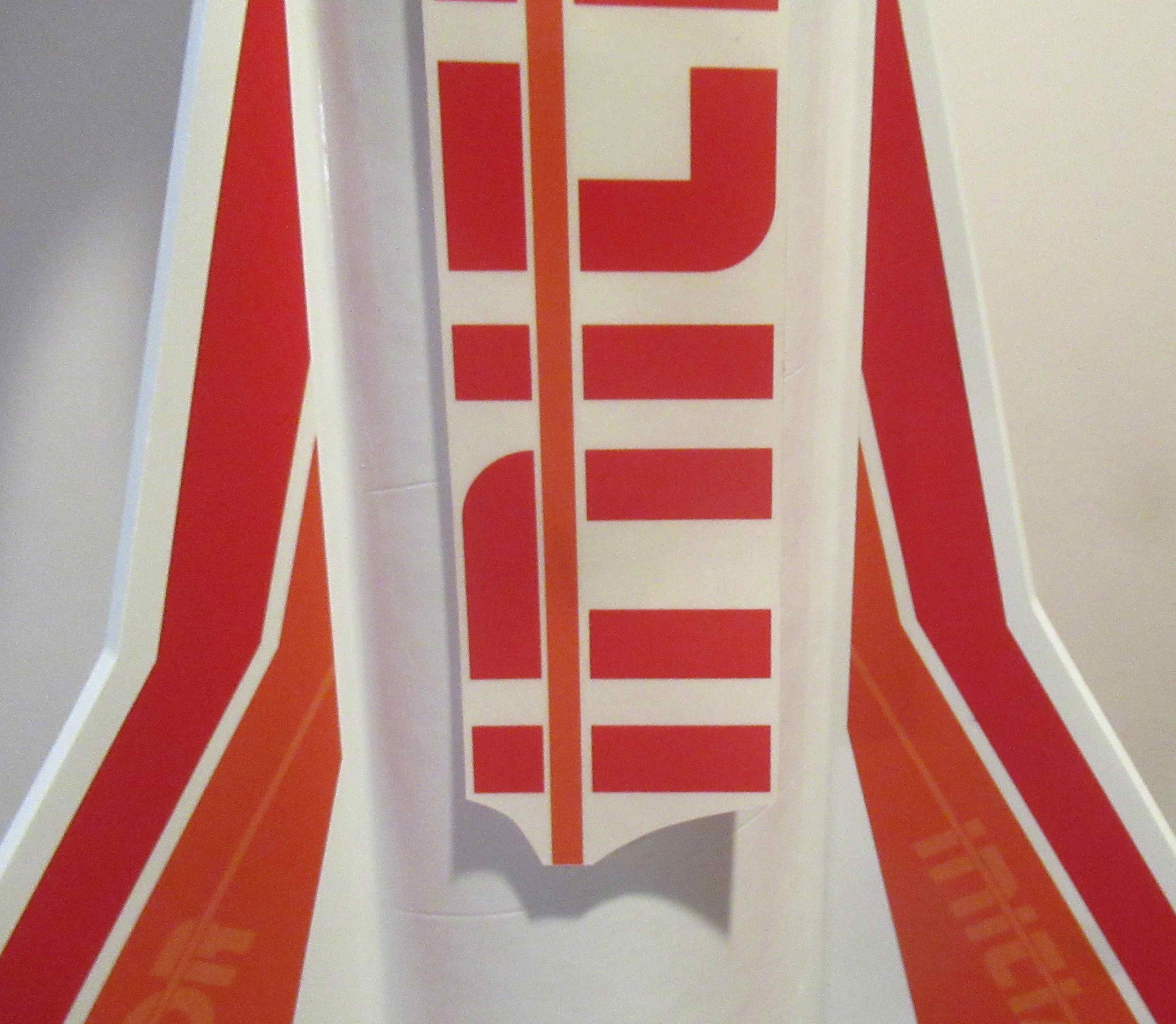
Estes Semi-Scale Saturn V, Kit #K-39, Part 30, The Paper Fin Overlays


The original kit fin stickers had faded and weren't usable.
I re-drew them in Corel Draw.

These were printed on peel and stick paper.


Simply cut out and stick on one side of the clear fins.

Set them in place held on the tip of your knife.


The root edge side of the stickers extended beyond the clear fin gap.

I lucked out - the gray I picked printed up a close match to the silver paint.

Another frustration - 
One of the four clear fins already broke out of the cut slot! I'll re-glue it.

Tuesday, July 1, 2025

Aerotech Mega Initiator #89541, Part 18, Setting The Name Sticker


From the last Mega Initiator post - 

With the O and R "cut" directly over the tube joint, sight down the body to make sure the orange line and type are straight. Tape down the sticker.  

Use your aluminum angle to check the orange stripe is straight.
The placement illustration says to overlap by 1/8", but I wanted to end up with a clean cut between the O and the R.
A 1/4" overlap puts the cut between the letters.

Double check the 1/4" overlay of the orange stripe joint before peeling off the backing.
I peeled the backing on the orange strip and lightly held the  vinyl. The backing was cut off up to the R. 

The orange stripe was set over the upper stripe matching the edges.
With the ends matched up, the backing is pulled under the name. Carefully set down the name checking the straightness as you go.
Add the "C" tail sticker at the low end of the orange stripe.

GOTCHA: The illustration drawing shows the "I" even with the top of the fins. The provided sticker lengths end up with the name higher up on the model.

Wednesday, June 25, 2025

Aerotech Mega Initiator #89541, Part 17, Setting The Name Sticker


Take it from an old typesetter - 
"Os" are typically taller and extend beyond the baselines of the other letters.
Be careful when trimming close so you don't cut off the top and bottom of the O.

You have to decide if the vertical orange line or the name INITIATOR will be centered between two fins.

The INITIATOR name is bolder so I decided to center that vertically.

Don't peel the backing off yet. With tape on the back to hold it onto the tube, measure and center the name. 
I am holding the name low, between the fins to find the center.


Rotate the to upper tube to line up the lower vertical orange line with the upper line trailing down. I used my aluminum angle to position the lines.


When both the orange ends are joined and touching, tape the body tube to keep everything in line.


With the vertical orange line overlapping about 1/4" at the top, it puts the break line between the O and the R.

Wait until the next post before peeling off the backing.

Tuesday, June 24, 2025

Aerotech Mega Initiator #89541, Part 16, Pulling The Mask - Sucess!


The nose cone was slipped in and the upper end was sprayed with Rusto 2X Apple red. 

I would normally prefer using Ace Hardware Premium Enamel, but their "Banner Red" is darker and I wanted to get close to the red color on the model stickers. In the end, if the top roll sticker and bottom fin red colors are a close match. You can't tell a difference with the visual distance between them.


After about 30 minutes the paint dried quick enough to pull the masks.

The color mask lines were clean and sharp.


I had a small bit of red that got under the tape.

This was easily scraped off the clear area using a knife blade.

Monday, June 23, 2025

Aerotech Mega Initiator #89541, Part 15, Matching The Nose Cone Color

The question has come up on the forums: 
"Which Red spray paint color will match the red sticker on the Initiator? 

Some considerations:
1. The nose cone is molded in black plastic so it would require a good white undercoat. Otherwise, you'll get a darker red on the sprayed nose cone.
2. The Aerotech printed stickers are translucent. The white paint under the sticker makes the red in the sticker almost a brighter red "candy" color. 

I've been to a few hardware stores with my kit stickers in hand, trying to match with any red spray paint available. Sure, they look close side by side, but on the model it's a different story.

Model building is a little like a puzzle. Sometimes I ponder assembly questions awhile until I can come up with a good solution. This one took longer than expected.
I decided to mask and spray the red on the wrap and nose cone at the same time. This will require masking the area at the top of the upper wrap.


Before spraying the model, I tested to see if the paint might bubble up on a scrap piece of leftover sticker material.

No bubbles and a good adhesion.
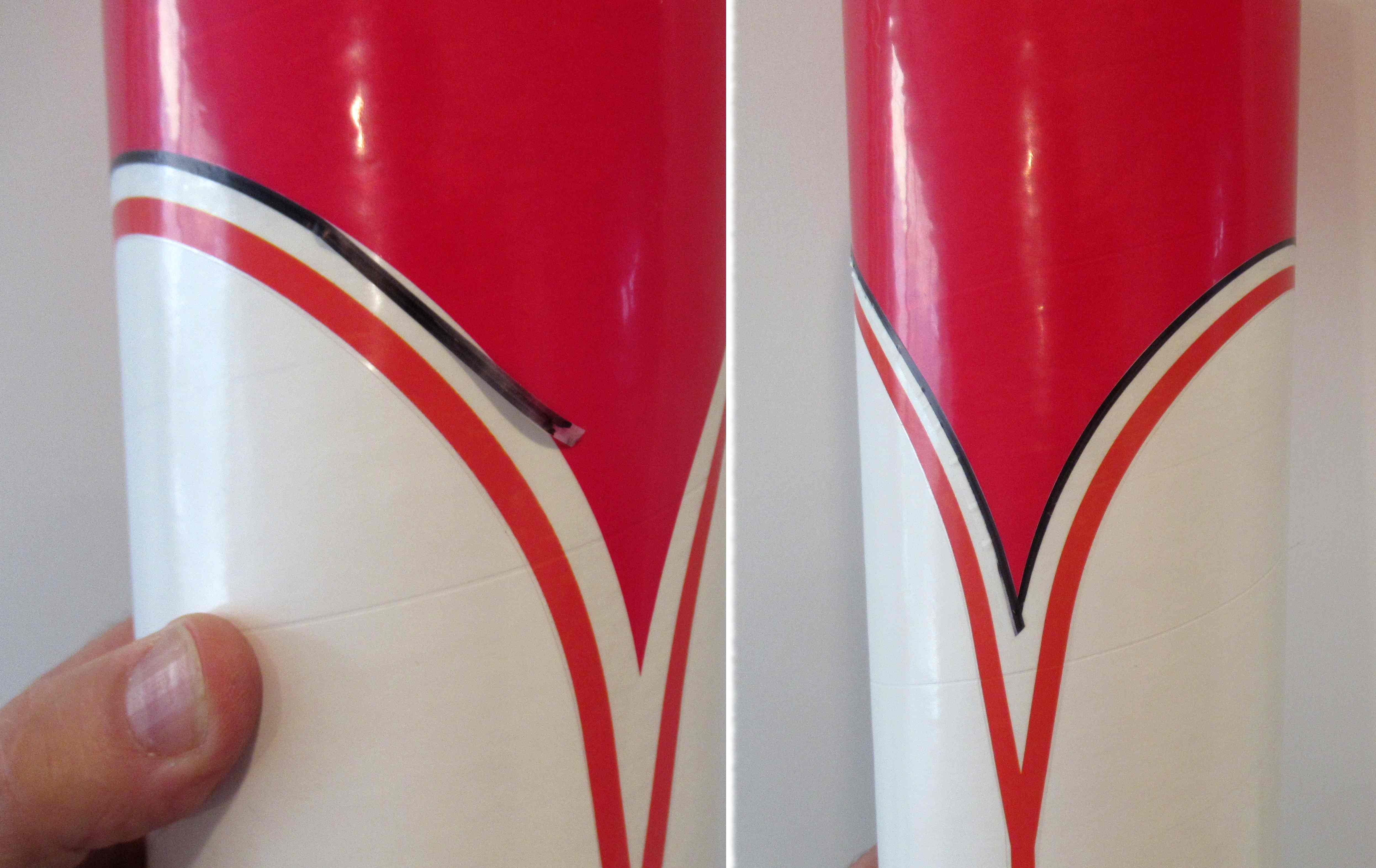
I marked a thin strip of Scotch tape with a Sharpie. After marking the tape, wipe off any excess ink with a paper towel.

I had to use a thin strip so I could flex the tape around the curve without raised folds.

On the right is the full border mask. The rest of the area underneath must be masked off.
Widen the mask below with a single strip of brown masking tape. Note there are many fold bulges. The upper edge covers about half of the Scotch tape mask.

On the right side is the full mask. The nose cone will be slid in and both will be shot with the same red color.

I know - Why not just use Tamiya tape? 
I'm cheap and I get just as good a result using inexpensive Scotch tape.

Sunday, June 22, 2025

Aerotech Mega Initiator #89541, Part 14, Applying The Upper Roll Stickers

A great thing about this design, the separate upper section allows you to center the vertical name and red stripes after the large roll sticker is in place. Simply rotate the upper section and center the remaining vertical name stickers between two fins.


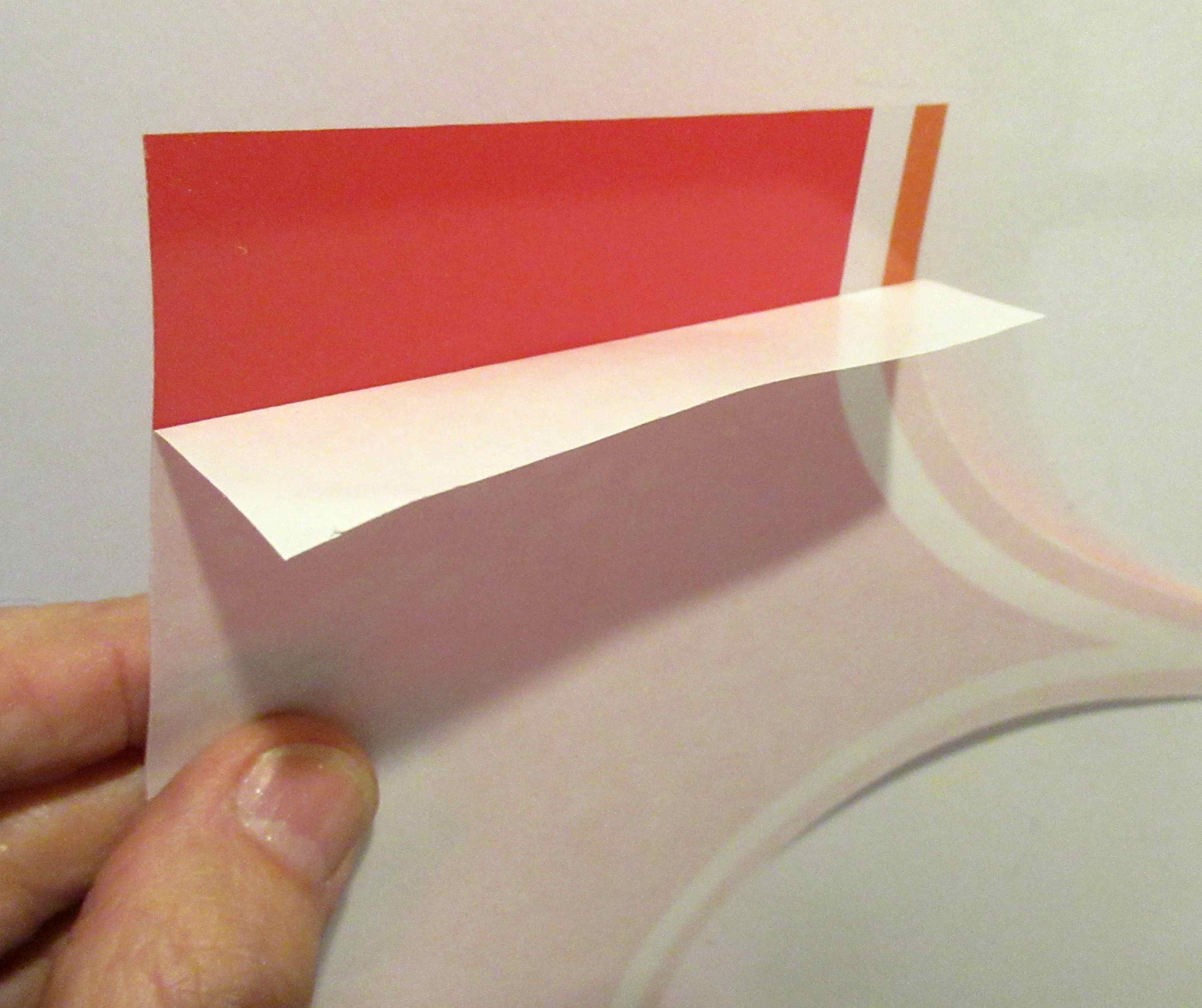
To start, don't peel off the entire backing,
Peel back an inch and fold back the backing paper.

This gives you control as you line up the left edge onto the faint pencil line you drew with the aluminum angle.


With the top and left side edges lined up - 
peel back the backing paper as you go.

Smooth the sticker removing any bubbles.
Peel back more of the backing paper and smooth again.

Continue around the tube to the starting point.


With any luck, you'll get a good match of the orange and red prints.

I had to carefully lift the sticker edges to erase the pencil line which showed up under the clear areas. Whew!

Mentioned earlier - these stickers go on without using water as a lubricant. They did go on easier than I thought they would.

Saturday, June 21, 2025

Aerotech Mega Initiator #89541, Part 13, Prepping More Stickers


Here's the upper body wrap. 
The curves were cut with scissors. Notice I cut a little away from the orange arcs, just playing it safe on the clear border.

Cut the straight lines with a knife and straightedge.


In addition to lining up the top edge with the tube end,
you'll need to line up the wrap left side down the tube.

Use your aluminum angle to draw a light pencil line down the tube, as long as the left edge of the wrap.


Before peeling off the backing, do a dry fit.

When the lower arcs were lined up, I noticed one side of the wrap was a bit tall. I went back with a straightedge and cut a long sliver to even up both sides.

Next post we'll attach the roll wrap. It's easier than I thought it would be.

Friday, June 20, 2025

Aerotech Mega Initiator #89541, Part 12, Applying The Stickers

I know - I postponed some posts on this build. There are good reasons why. 
I'm not very experienced making epoxy fillets. Sure I've done them, but I'm not enough to show you a best method. 
Another reason - It's difficult to get an even, gloss paint finish on large rockets using store bought spray cans. If you've ever tried to get a good gloss on a 4" diameter model you know what I mean. You really need a spray gun and maybe an auto body spray booth! 

 I do have experience with stickers, this kit has peel and stick decor. But, there are some concerns. Some kit stickers are now printed at Aero tech and require different considerations. 
In the past I've wet the surface of the model and dipped the sticker in a dish of water. The water allows repositioning. It's rare when a sticker is perfectly positioned on the first try. 
I tried the water dip but it loosened the adhesive on the back of the sticker! Pulling up the sticker to reposition it lifted off the adhesive making the surface lumpy and unacceptable. 
Something different about these stickers - Using no water allowed for some lifting and repositioning! 
They still grab so be careful when initially setting them on the model surface.

You may have an older Aerotech kit, the stickers might work fine when dipped in water. 
TIP: Test using water on some of the blank scrap material between the print images.


It helps to dry position the fin stickers.

Don't peel off the backing yet!
Here is a roll of masking tape on the back of a fin panel.
The decal is dry positioned on the fin and the tape pressed to hold it in place.

With the sticker set on the fin - 
Use some small pieces of masking tape to "frame" the sticker centered on the fin.

Lift the sticker panel leaving the tape frame in place.
Peel off the backing and set the sticker on the fin using the masking tape frame to position the sticker.


Smooth out the sticker from the center to the outside edges.

With any luck the other fins should be centered (even white borders) and mirror each other.
Tuesday, December 3, 2024

Enerjet by Aerotech Strong Arm Build, Finished


All three Strong Arm builds posed in my patio.

Two are show builds with filled seams and more time spent on fillets.

On the right is a flight build, not as much build time involved. Body tube seams are visible and not as smooth a finish. 10 foot rule on this one.


I rarely use Rustoleum, but that was the best paint match for the tall gray stickers on the upper body.


Some graphics are large and look great overall.

Plenty of small labels too.


The low end fins. 
The fin locks feel very sturdy.

So far, this is a favorite of the mid-power builds I'm doing for Aerotech.

Monday, December 2, 2024

Enerjet by Aerotech Strong Arm Build, Part 24, Engine Retainer


The inside edge of the motor retainer should be roughed up for better epoxy adhesion.

I used the back side of my knife to scrape off the paint. Using the back of the blade will rough the surface and not dull the sharp side of the knife.


The fit of the ring is tight.
To make an easier slide in and seat, the edges of the motor tube were slightly rounded with some 320 grit sandpaper.


Here's the ring slid in until the motor tube butts up against the raised ring inside. 


After the epoxy dries, the cap can be screwed on. 

The trailing edges of the fins are longer than the retainer cap so the rocket can stand on it's fins.

Sunday, December 1, 2024

Enerjet by Aerotech Strong Arm Build, Part 23, Final Stickers


I'm building three of the Strong Arm kits for Aerotech and wanted consistency in the models.

I made a template out of cardstock.
Trace around one of the fins.

With the backing still on, set the sticker on the cardstock in a good placement.
Draw around the sticker border and cut out the square.


This is another wet sticker placement.
Set the sticker on the fin, lay the template over the fin and check the sticker position.

Lift and replace until it is centered in the cut out "window".
These dots or screw stickers were included but there is no reference of the placement. I decided to leave them off the rocket.

Placing the stickers takes time!
I counted 66 stickers on each model!

Saturday, November 30, 2024

Enerjet by Aerotech Strong Arm Build, Part 22, Small Stickers


There are a LOT of small stickers
Thin strips can slide while cutting using a metal ruler. Make the cuts carefully.


I'd recommend keeping the small stickers in zip lock bags. 
I was being careful and one fell off the workbench. I had to scour the floor to find it.


The RADOME stickers are spaced 90 degrees around the top of the tube.
I reused the placement guide to evenly place these stickers.

Thursday, November 28, 2024

Enerjet by Aerotech Strong Arm Build, Part 21, Body Stripes

I wrapped a piece of cardstock around the body tube to use as an edge guide for the body wrap strips.
If you've ever tried to get a stripe to meet up after wrapping it around a body tube, you'll appreciate a cardstock guide.

For a cleaner look, start and finish the strip over the launch lugs.

I read these colored stripes designate if a missile is a dummy or armed. 


Tape the guide edge in place, 
Wet the body tube where the stripe will go,

Peel off the backing, dip the strip in some water and leave wet.

As I rolled the stripe around the the tube, I would dip my finger in some water and wipe it under the thin sticker.


Here's the lowest stripe.

Notice the overlap, again centered over the launch lug side. Hiding the overlap joint makes for better pictures on the launcher.

The longer yellow and black stripes go all the way around the tube.
The shorter red, gray and black stripes fit between the dorsal vanes.

These are a little tougher to place, you'll want all separate four segments in line.
For a guide, I placed strips of masking tape on all four sides. I could visually align the stickers against the masking tape strips. 
The red and gray strips are longer than needed. Set one end against a vane side, trim the overhang off the other side with a razor blade.

Wednesday, November 27, 2024

Enerjet by Aerotech Strong Arm Build, Part 20, Placing The Fin Stripes


Cut a strip of cardstock 15/16" tall.

Set the strip edge into the fin/tube root edge joint.

The strip side is set against the top edge of the cardstock. 

Notice the rear edge overhangs the trailing edge. 
While the front edge of the sticker matches the angle of the leading edge, the trailing doesn't quite match. 

Leave some overhang and it can be trimmed off after the set sticker dries.


Recess the from edge of the sticker very slightly.
No reason to let it overhang. You want good adhesion without rolling it over the leading edge.

Tuesday, November 26, 2024

Enerjet by Aerotech Strong Arm Build, Part 19, Placing The Roll Bar Stripes

Setting the vertical roll bar stickers straight with even spacing is difficult. 
How can you leave 17/32" space between them accurately?
      

Two vertical stripes have to be centered between the fins. Mark the center line first. 
Make a simple cardstock centering guide. 
Roll some cardstock around the tube, mark the end of the dorsal fins. Using a ruler, find the center and mark. Make light pencil center lines on the tube. 

Repeat and find the centers between all the dorsal fins.


Before placing any stickers - 
Use a clean knife blade to lift and handle the stickers.

Rub a line of water on the body tube where the sticker will go.
After peeling off the sticker backing, dip it in water and leave wet. The wet sticker allows you lift and reposition.


Notice the placement guide I printed out.
I drew pencil lines, 1/4" to each side of the print line to total 1/2", the width of the stickers.

The low end of the placement guide was slid down to the 6 1/2" top of the sticker position.

Set the top of the sticker between the pencil lines

Use the aluminum angle to line up the sides of the stickers. 
When done, you should be close to the recommended 17/32" spacing between the bars.