
Showing posts with label Trim. Show all posts

Tuesday, April 16, 2024

Estes Mini Bertha Clone, #TK-3, Part 11, Two-Layer Decals

This was one of those home print decals that didn't give a good opaque coverage. With the nose cone in place you can really tell the difference between the two blacks.
On the left is a single layer decal, on the right is a two layer. There is a big difference. Sometimes home print decals don't cover over white paint.

Lay down the first decal and let fully dry overnight.
To apply the second decal - 
Soak the decal, wet the first decal already set on the tube. The surface is wetted down so the second overlay decal can easily slide into position.
As you are positioning the second overlay decal, simply line up the ink lines on the decal underneath. It's easier than it sounds.


I only had to double the two wrap around decals. The two Mini-Brute bugs looked fine.

Here's the shock cord ties.
The nose cone screw eye got the Duncan Uni-Knot.

The Kevlar / Elastic shock cord got interlocking overhand knots.

There was some clear decal overhanging the top of the body tube. When the decal is completely dry, you can shave off the edge with a razor blade.
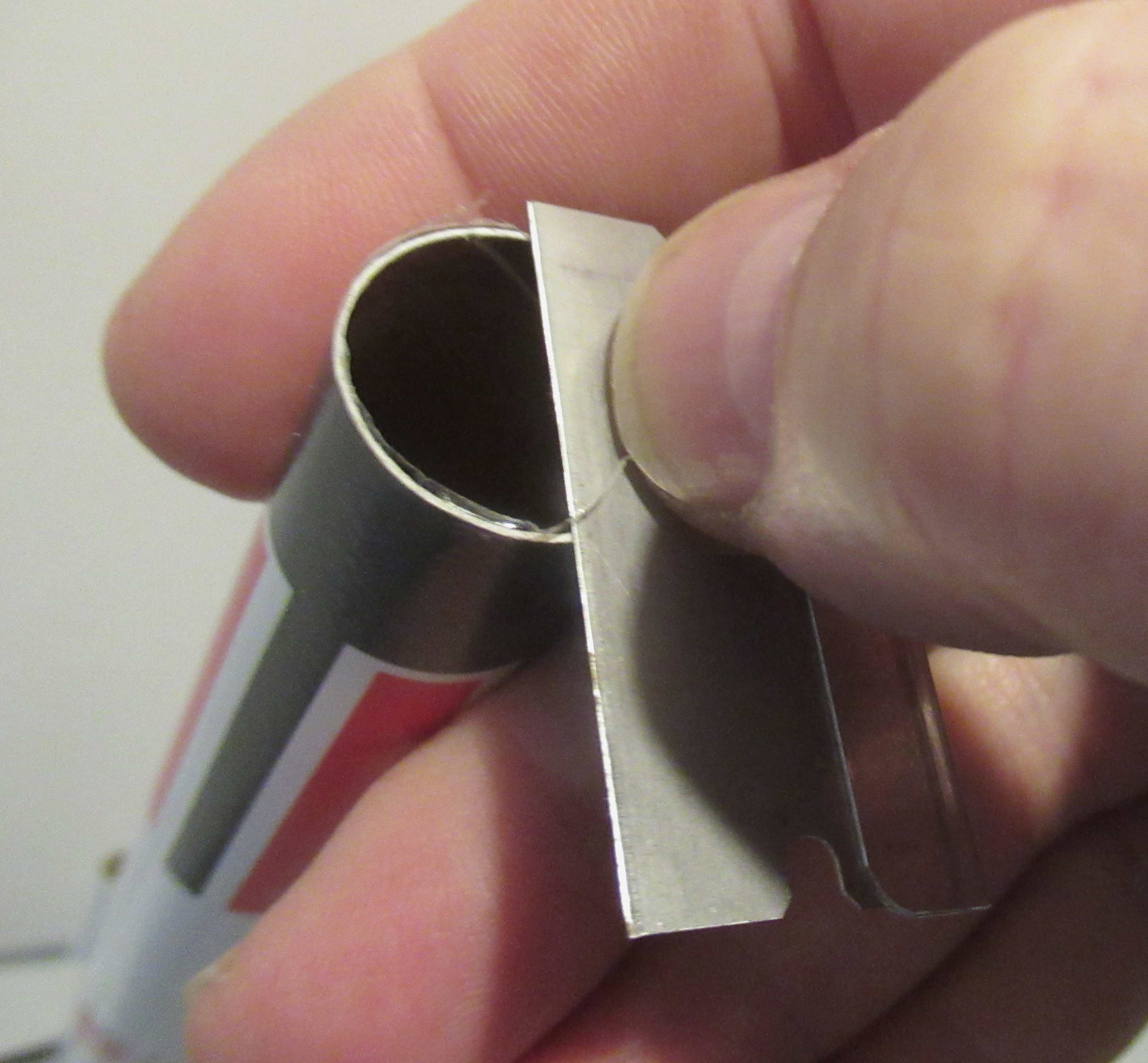
Use a "sawing" back and forth motion when cutting off the clear overhang.

Apply some clear acrylic Future on the exposed edge so it won't peel back. I don't overall clear coat models, just decal edges like this. 


The tube edge got some Sharpie to blacken up the white paint.
 

Sunday, April 16, 2023

Estes Klingon Battle Cruiser, #1274, Step 26, Chrome Trim Positioning


A few of the chrome trim pieces were long (on the left) and two others too tall (right).

I didn't want to do the trimming after the pieces were on the model. These were stuck back on the backing paper and cut.


As my usual practice,
The sticky back pieces weren't touched where I could help it.

I positioned the pieces while they were stuck on just the tip of my hobby knife. 


Here's the outside wing trim pieces.


The windows sticker was trimmed earlier to fit the the height of the flat side of the bridge.

Thursday, March 30, 2023

Estes EAC VIPER #0820, BT-55 Upscale, Part 13, Purple Fin Stripes


Here's how the yellow paint looked after the tape was pulled.


This model coloration was interesting. While it looked great in print, it would be a very difficult model for a young builder to duplicate. 

The EAC Membership Kit contained a sticker sheet with fin logos and the tall ESTES AEROSPACE CLUB that runs down the body tube. Not included are the Purple stripe fin decals and the upper purple tube wrap.

I drew up many more fin stripes as it might take some practice to get the placement right.


Set right on the yellow/white mask line, the purple stripe.
Try a dry fit (no soaking yet) to see how is sets and overhangs.

  
Soak and transfer the stripe. Slide it right up to the yellow/white paint mask.
Roll over the ends.

You can trim the overhang at the mid point of the leading edge using a simples slice of a razor blade, but . . . 
Trimming with a razor blade might slice into the balsa fin.


I found it easiest to lift the overhang and trim it off at the appropriate angle with small scissors.

Try to cut the stripe end just past the middle of the rounded leading edge.
More in the next post . . .

Friday, March 3, 2023

Fin "Ink"- spiration

Richard L. Thompson posted on the Facebook Estes Model Rocket page:
   

 "Just a little DIY Fin detailing without paint. Just Sharpies over a few coats of yellow Krylon."

That's a great fin treatment! It looks to be a pretty even color coat from a felt tip Sharpie!
Don't expect a perfect even color when using marker pens.
This would work best when used over a light background color like this yellow.

Saturday, October 1, 2022

Estes Space Shuttle Columbia Build #1385, Part 20, Trim Decal Flaking & Nose Cone Mask Fix


After trimming, the edge of the gray trim decal lifted a bit. Normally you can brush on a bit of Future and that will tack down the lift.
I dipped a Q-tip and rolled it over the edge knowing some would seep into the lifted area.


I lightly pressed down the edge and some of the gray paint chipped off leaving some white from the decal sheet.


Well, it was worth a try!
I ended up pulling up the gray trim decal leaving the entire bottom of the wing black. I won't be doing another full model mask on this one. It's a semi-scale model now with semi-scale paint.


There was a piece of clear tape that overlapped a mask line on the side of the nose cone.

A marked tape strip was set down. Black paint was sprayed in a cup and the touch up brushed over.


Here's the bottom showing some of the completed masks and touchups.
Perfect? No - This was a difficult multi-layered mask.

Friday, September 30, 2022

Estes Space Shuttle Columbia Build #1385, Part 19, Setting The Gray Trim

This Gray trim on the leading edge of the wing underside didn't work! 
I'll still show the process. Sprayed decals can be a good workaround, especially a simple color band wrapped around a body tube. The more complex the surface, the more likely this trim may not be an option. 


The paper template was cut out. A glue stick was used to stick the paper down onto the gray painted (white) decal sheet.
The decal sheet was cut out with scissors around the paper template.
The paper template was peeled off the decal.


There was some paper fibers and glue still on the gray painted decal.
Not a concern - this will dissolve when the decal is soaked.
The gray decal trim was soaked and set over the leading edge of the wing.
Here the wing is held up to a bright light to see the overhang and visual placement of the decal.


After the decal thoroughly dried - 
With a sharp blade the decal overhang was trimmed off.

Go slow, don't cut into the leading edge paint or balsa.

Saturday, January 15, 2022

Estes Skylab #001973, Build, Part 31, Finishing Up

Before the Dullcoat can be applied, 
You'll have to mask off the silver on the fairings and fins.
Dullcoats (and gloss clearcoats) will turn Silver paint into a dull gray!

I made some covers out of folded paper to cover most of the fins.


Here's the back end covered for the dull coat.

Before spraying, brush off any dust with a soft brush. Any dirt could be locked under the dull clear coat.


Well - this was disappointing!
The dull coat shriveled up a few of the small camera target decals. Not all of them, just two.
I don't think I went too thick with the clear. 
TIP: You might want to try some Micro-Sol to be sure the decals are sitting IN the corrugated surface and do light mist coats of the clear.


The last things glued on were the Solar Array Panels.
Mentioned earlier - You'll find it easier to glue these on after the painting is done.

I won't be covering the shock cords and parachute assembly. The shock cords use a standard tri-fold mount. Parachute assembly is normal - just larger in diameter.

Saturday, November 27, 2021

Quest/Aerotech High Q, #Q5012, Part 4, Stickers 2

GOTCHA: Here's the upper wrap. The wrap wasn't long enough to meet at the ends.

I didn't want to leave that white gap.
FIX: It was filled with a strip of my "go-to" vinyl, Contact Paper Blackboard Covering.

The vinyl strip isn't a full gloss, but it's better than the white band. The flat surface of the Contact Paper fill strip was "shined up" with some Future floor finish later on.

As I understand it,
TRIVIA: The High Q originally a two stager. The booster (Stage "1') was dropped before it went into production.
The "2" on the fin is left from the two stage version.

Two strips of masking tape helped with the positioning of the "2".
I wanted to be sure it was square and centered.
The tape was set down while the sticker was cut and still on the backing. Set the tape right at the sticker border edge.

With the tape in place, then peel off the backing and set to the edges of the sticker against the positioning tape. Remove the positioning tape.

There are three Quest logos that are spaced evenly around the tube.
I set mine down the fin line and directly above the masked lines down the body. Note the center pencil line on the tape.

Another strip of tape let me line up the left side of the sticker.

Friday, July 30, 2021

Estes DARC-1, #7307 Build Part 8, Removing The Back of the Aero Shroud


The back end of the aero shroud is cut off around the raised step.
Trace around the raised half circle with a pencil.
This plastic at the "hump" is thick, I'd recommend using a thin razor saw to cut through it.
The rounded plastic wall near the fin slots is much thinner. Cut through this round side carefully with a sharp knife. Mark with a pencil and cut with a few light passes. 
Be Careful - Your blade could go through the plastic when you don't expect it. Don't let it get away from you -  
Cut these curves first, then work on the flats connecting the cuts.


This picture shows the thick plastic at the top half round.
The outside plastic towards the fin slots is thin by comparison.

Friday, June 11, 2021

Estes Antar Leading Edge Trim - TIP

I'm a little embarrassed -
I built a few Antars for Estes and didn't notice the silver line running down the leading edge of the wings. I tend to follow the instructions and plan ahead, but didn't see the silver trim.
The Antar is a difficult model to mask and paint. I wasn't excited about another thin mask down the wing edge so I decided to try something new.
Sprayed decal trim has it's place and has worked in the past. But, this trim strip rolls over the round leading edge of the wing. It'll have to be wide enough to hold on when set onto the top and bottom.

This is not an easy technique and might be avoided if you aren't comfortable using water slide decals.
 
I sprayed silver paint on a scrap piece of white decal paper. White decal paper will show off the silver better than a clear decal sheet.
The spray paint seals the surface, no additional clear coat is needed. After the paint dries, you can go right to cutting and a water soak for transferring.

The strip is about 1/4" wide. The front end is rounded to roll around  the leading edge. I was surprised how the rounded edge of the decal disappeared into the fin tip fillet. 


The decal strip was cut a little long and will overhang the the end.

After the decal is fully dry, the overhang was trimmed off with a new single edge razor blade. Try using a back and forth sawing motion.
The decal strip held well but might curl and lift over time.
I don't like clear coats but used a little Pledge clear acrylic on this one. 
It won't take much. Dip the brush and wipe off the excess.
Run the brush over the edge of the decal, only covering about an inch at a time.


Immediately wipe off the shiny excess. 
There will be some of the Pledge that will run ender the decal edge helping it adhere to the surface.

That silver trim line adds a lot to the finished build.

Tuesday, August 25, 2020

Centuri Flying Saucer #5325, Part 12, Glow In The Dark Dots

Here's a case of a single guy with too much time on his hands. I'm going to add the glow in the dark dot "lights". These were a special added feature of the Centuri kit.

From the instructions:
"SPACE GLOW DECALS" There are over 70 of these round dots, more than enough to decorate your model. One goes into every round embossed area on the main shroud and around the core tube. These dots, printed with a special ink are phosphorescent. This means they soak up available light and then glow in the dark."

Using a Michael's 40% off coupon I bought a can of Krylon "Glowz In The Dark" paint for $4.80.

Half of a peel and stick self adhesive page was sprayed with the glow paint.
A simple 1/4" punch was used to knock out many small dots.

TIP: If your dots aren't cutting clean, flip over the sheet and punch with the backing side facing up.


Place the dots using the tip of your knife blade and lightly burnish.


With my pantry door shut and the lights off - Here's the saucer with glowing dots. There is also some glow dots in the center core.
Rocket Nerd SUCCESS!
No . . . this wouldn't make the saucer more visible at a night launch.

Sunday, August 23, 2020

Centuri Flying Saucer #5325, Part 10, Trim Pieces & L Brace Gluing


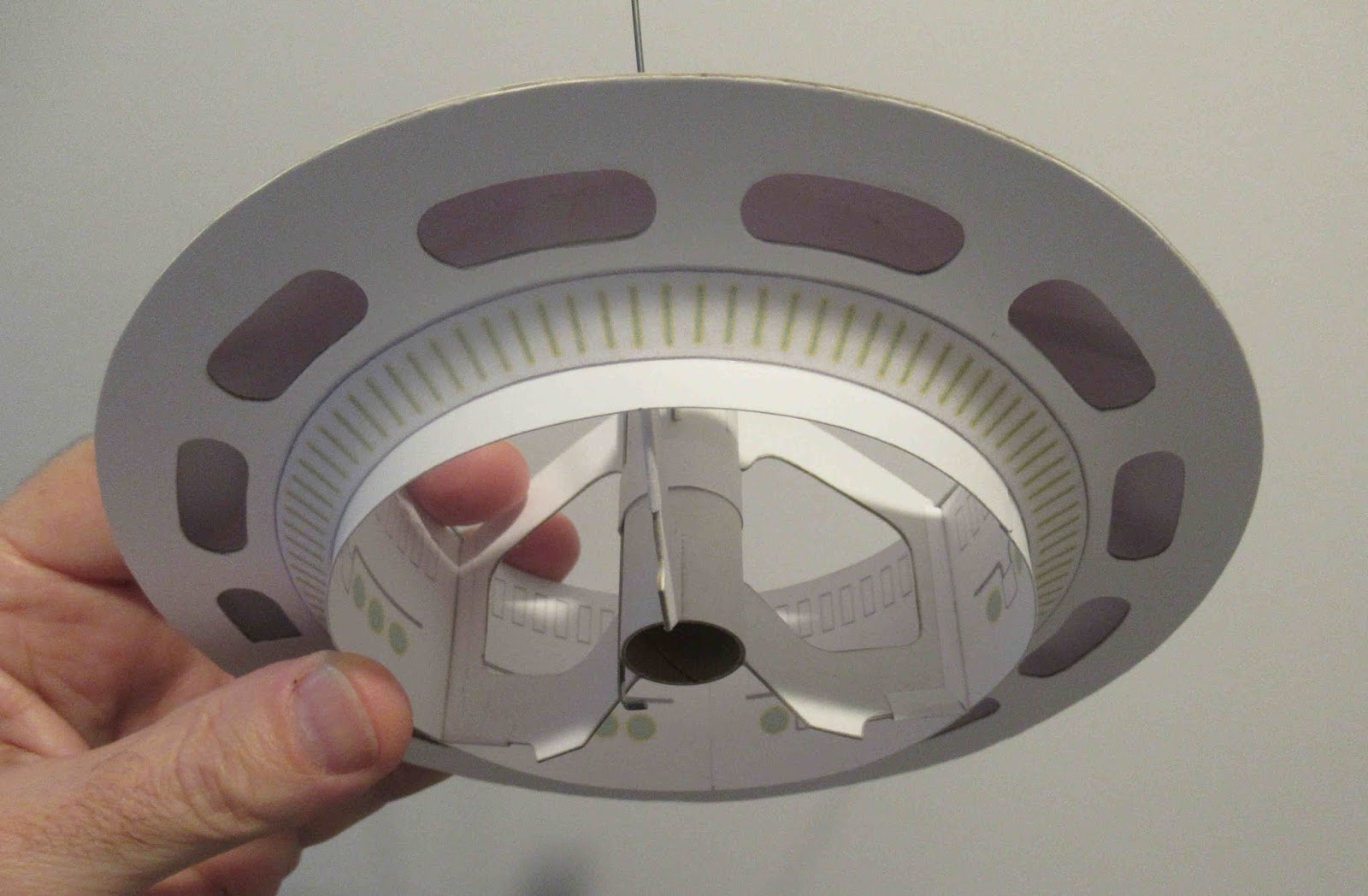
The fit of the minor shroud was very good. It covers the cogs on the inside of the large ring.
The three L braces also needed some trimming on the outside edge to fit between the core tube and engine mount tube.

It's difficult to get the l braces in place without making a glue mess - try gluing the outside edge first - then glue the root edge to the motor mount tube, explained below:

The outside edge of the L brace is glued to the interior ring first (one side) and allowed to dry. This makes a glue "hinge" to swing the root edge away from the motor tube pencil line.
On the left you can see the faint pencil gluing line. The picture on the right are some small glue dots. Notice the root edge of the L piece is turned away (hinged) from the glue. After the glue dots are applied to the pencil line, swing the L brace and slide it into the glue. Wipe off excess glue and glue fillet both sides of the joint later.


The bottom detail strips were placed using a glue stick.


These fit along the bottom edge of the core tube.
The hatch is centered in the gap between the cutouts. It was also too tall and needed trimming to fit.
Thursday, July 23, 2020

Estes Tazz #7282 Build, Part 9, Engine Mount Trim TIP


Here's the engine mount, the streamer is taped to hold the end down.
The low end of the engine mount has 3/16" of bare tube exposed.
I didn't want to go through a tight masking job with the white lock ring in the way.


I sprayed some scrap peel and stick paper stock with gloss yellow.


A 3/16" wide strip was cut.
The engine hook was lifted and the strip end started under the hook.
Release the hook, continue the sticky strip around the bare tube.
Cut the end, hide it under the raised engine hook.


Here's the finished engine mount with a smooth yellow end.

Monday, June 8, 2020

Estes Doorknob, #9720 Build, Part 11, Decals & Chrome Trim

This is the fin rivet and bolt plate decals.
The wider spaced rectangles go to the top. The decal strip is centered down the root edge.

If you are new to water slide decals -
TIP: The picture on the right shows the transfer onto the model. Wet the decal placement position on the model before transferring the decal. Slide a little of the decal off the backing sheet. Set the bottom of the decal onto the model, and continue to slide the backing up and off leaving the decal in place.


Here's the rivet plates on two facing fins.

TIP: Notice the paper wrap at the top. This keeps the model clean while handling. The paper wrap is rolled on and taped in place. Tape the paper wrap to itself, not onto the painted model.
The self-adhesive chrome strips are thin. They are place over the paint mask line. The raised paint edge could show through the thin chrome band.

TIP: Lightly sand the color separation line where the chrome strip will be. The masking paint ridge could show through the chrome band. I've wrapped some 400 grit around a Q-tip for cushioned sanding. Don't over sand, just knock down the raised paint edge.
The placement of the chrome strips shown in the instructions was confusing. I understand it is being corrected.

I wrapped a copy paper strip around the body tube for a straight line reference. You'd be lucky if the sticky wrap would end up in a straight line  without a guide.

On the right, keep your fingers off the sticky back side of the thin bands. Dirt and fingerprints could show through.


Here's the finished wraps.
Chrome always adds a lot to the finished look.